




Why it matters

Nobody blames the room. They blame the meeting.

Walk in, tap the panel, and the call is up before everyone has sat down. That is the whole brief. A room that misses it makes every meeting start late, and people quietly stop booking it.

The causes are usually mundane: kit picked from a catalogue without anyone measuring the room, a microphone that cannot hear the far end of the table, and no monitoring after handover. So we survey the room first, design the audio for coverage, and keep the room on the managed service once it is in.

How a room goes together

Walk in. Tap once. Start on time.

The kit

Shure IntelliMix Room Kits, by room size.

Complete room kits matched to the room rather than the budget line. Sizes below are Shure’s own.

Kit Room Certified for
Kit 30 Small to medium rooms Teams Rooms · Zoom Rooms
Kit 50 Medium to large rooms Teams Rooms · Zoom Rooms
Kit 70 Large rooms Teams Rooms · Zoom Rooms
Kit 80 Large rooms, multi-camera Teams Rooms · Zoom Rooms

Worth knowing: Shure ships these kits certified for Microsoft Teams Rooms and Zoom Rooms. There is no Google Meet variant, so if you are standardised on Google Workspace your room will be built on Logitech hardware instead. We would rather tell you that here than after the survey.

  • Microsoft Teams
  • Shure
  • Logitech
  • Zoom
  • Google Workspace
What you get

A room that behaves the same every time.

Designed for coverage, installed tidily, commissioned properly and then watched. The boring version, which is the one that keeps working.

Before the Install
  • Room survey covering seating and sightlines
  • Audio coverage plan, not a product list
  • Cable routes agreed with the fit-out
  • Platform and licensing confirmed first
On the Day
  • Cabling concealed in trunking or ceiling
  • Commissioned and gain-staged to standard
  • Room account, calendar and panel live
  • Handover walkthrough with your team
Afterwards
  • Room monitored on the managed service
  • Firmware and updates handled for you
  • Faults raised before your first meeting
  • Usage reporting per room
Book a room survey
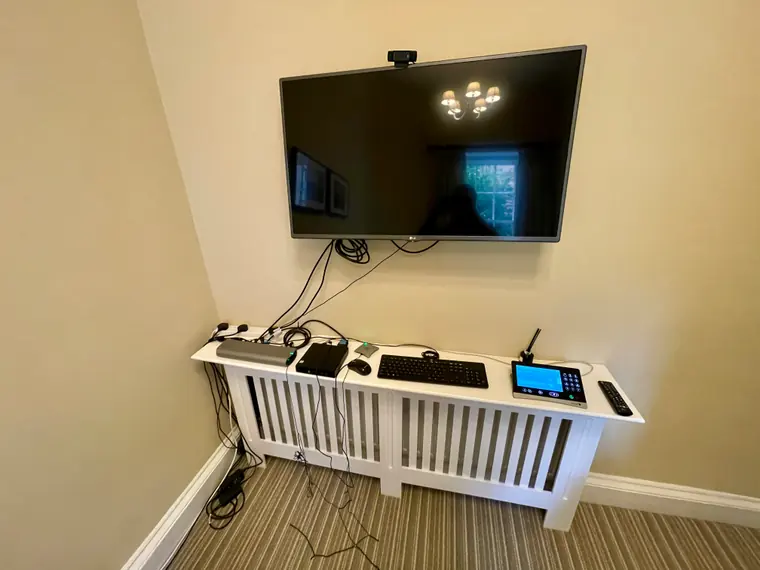
Before: a wall-mounted TV with a consumer webcam balanced on top, a keyboard and mouse resting on a radiator cover, and loose cables trailing down the wall
Before
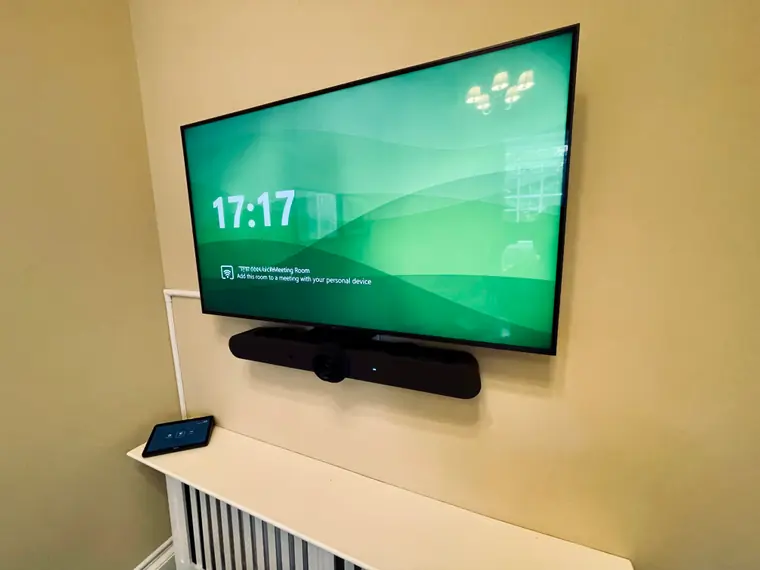
After: the same wall with a Microsoft Teams Rooms display, a Logitech video bar mounted beneath it, a touch controller on the side, and the cabling run in white trunking
After
How we work

Rooms, from survey to support.

Teams Rooms, Certified End to End

Certified hardware, a room account, one-tap join and a scheduling panel on the wall. The room appears in your room list, so people book it like any other resource.

  • Certified compute and cameras
  • Room account and calendar
  • Scheduling panel outside the door
One tap to join, every time

Audio That Carries the Meeting

Video failures are annoying. Audio failures end the meeting. We design for coverage, so people are heard wherever they sit, including the person at the far end of the table who never leans in.

  • Shure ceiling array microphones
  • Networked ceiling loudspeakers
  • IntelliMix DSP, hardware or software
Ceiling arrays where they earn it

Surveyed Before Quoted

Seating, ceiling height, glazing and how the furniture actually moves change the answer more than floor area does. We survey before we quote, so the kit list fits the room you have.

  • Coverage plan, not a product list
  • Cable routes agreed with the fit-out
  • Sightlines checked from every seat
Every room surveyed before quoting

Any Platform, One Standard

Teams, Zoom or Google Meet. Room systems are certified per platform, so the platform you already use drives the kit list. We will tell you where that limits the options.

  • Microsoft Teams Rooms
  • Zoom Rooms
  • Google Meet room hardware
3 platforms supported

Rescue and Rework

Rooms built for a platform you no longer use, microphones placed by eye, or a system nobody ever monitored. We will tell you what is salvageable and when replacing is cheaper than rescuing.

  • Survey of the existing install
  • Salvage versus replace, costed
  • Platform migration without a rip-out
Straight answers on old kit

Monitored After Handover

Rooms join the managed service. Firmware stays current and a room that fails becomes a ticket we raise, not one you raise from a meeting that has already started.

  • Firmware and updates managed
  • Faults raised before the meeting
  • Usage reporting per room
24/7 room monitoring
FAQ

Common questions about meeting rooms.

What is a Microsoft Teams Room?

A Microsoft Teams Room is a meeting room running certified hardware that joins Teams calls with one tap, rather than someone plugging a laptop into a cable and hoping. The room has its own account, appears in your room list when people book meetings, and shows the calendar on a panel outside or on the table. Certification matters: Microsoft tests specific camera, microphone and compute combinations, and only certified kit gets the one-tap join and the automatic updates.

Do you only do Microsoft Teams Rooms?

No. Teams Rooms is the most common request because most of our clients are on Microsoft 365, but we design and install Zoom Rooms and Google Meet rooms too. The platform decision drives the kit list rather than the other way around, because room systems are certified per platform. If you are on Google Workspace, that points at Logitech hardware, since Shure ships its IntelliMix Room Kits certified for Teams and Zoom only.

What size room needs what kit?

Shure IntelliMix Room Kits map to room size directly: Kit 30 for small and medium rooms, Kit 50 for medium and large, Kit 70 for large rooms, and Kit 80 for large rooms that need multiple cameras. Logitech is sold the same way, from huddle spaces up to large and divisible rooms. We survey the room before quoting, because seating position, ceiling height, glazing and how the furniture actually moves change the answer more than floor area does.

When do you use ceiling microphones instead of a table microphone?

When the table is not fixed, when the room is a boardroom where a table array would be in the way, or when the acoustics are difficult, which usually means a lot of glass and hard surfaces. Shure ceiling array microphones and networked ceiling loudspeakers cover the room rather than a spot on a table, so people are heard wherever they sit and nobody leans into a puck. They cost more and they need a proper install, so we recommend them where they earn it rather than by default.

Can you fix a room somebody else installed?

Usually. The common faults are a room built for a platform the business no longer uses, microphones placed by eye rather than by coverage, or a system nobody ever put on a monitoring platform, so it has been quietly broken for months. We will survey it, tell you what is salvageable, and be straight about when replacing is cheaper than rescuing.

Do you support the room after it is installed?

Yes, and this is the part that separates an installer from a supplier. Rooms join your managed service, so the system is monitored, firmware is kept current, and a room that fails is a ticket we raise rather than one you raise from a meeting that has already started.

Survey first, quote after

Tell us about the room.

Send a photo and the rough dimensions and we will tell you what it needs. If the honest answer is that your existing kit is fine, that is the answer you will get.